Free Β· Open source Β· For Windows

Find the phrases your documents share, and the ones they repeat

Two small, fast programs built on the same text-matching engine. They work entirely on your own computer, so your documents are never uploaded, stored, or seen by anyone else.

Your documents never leave your computer.

No installation, no account, no internet connection needed.

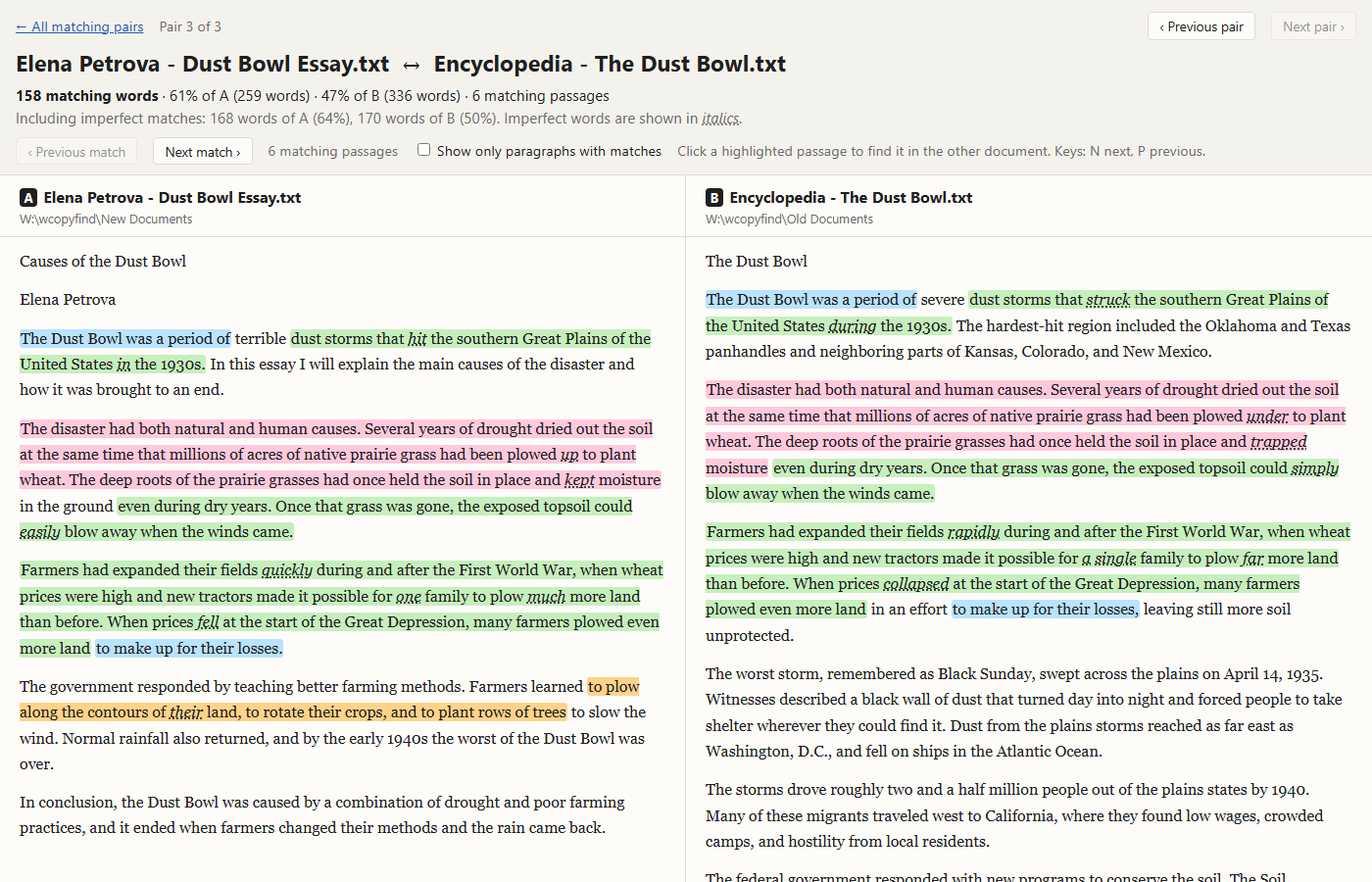
A WCopyfind report showing two documents side by side, with the passages they share highlighted in matching colors

WCopyfind

Compares documents with each other and shows you every phrase they share. Teachers use it to catch plagiarism and copying between students; researchers use it to trace how text moves between sources.

  • Checks hundreds or thousands of documents in one run
  • Finds copying even when a few words were changed
  • Shows each matching pair side by side, with the shared passages highlighted

WRepeatfind

Looks inside one document, or a whole book, for phrases it repeats. Writers and editors use it to catch the paragraph that was moved but never deleted, and the sentence that turns up twice.

  • Checks articles, essays, reports, and multi-chapter books
  • Finds repeats even when they were lightly edited
  • Highlights every copy of each repeat, and lets you dismiss intentional ones

Your documents never leave your computer

WCopyfind and WRepeatfind read and compare your files right where they are, on your own PC. Nothing is uploaded, nothing is stored in the cloud, and no one else's computer ever sees your text. There's no account to create and nothing to sign in to, and the programs work without an internet connection.

That makes them safe for the documents that matter most: student papers, unpublished manuscripts, theses, legal and business files, and anything confidential. Many online plagiarism checkers keep a copy of every paper submitted to them. These programs keep nothing, because they never receive anything.

The one exception is by your choice: if you add an internet shortcut to WCopyfind, it downloads that web page to compare it. It never sends your documents anywhere. Read the full privacy statement.

Which one do I need?

If you want to…Use
Check a class set of papers for copying between studentsWCopyfind
Check papers against sources, past years' papers, or web pages you've savedWCopyfind
See how much text two versions of a document, two bills, or two news stories shareWCopyfind
Find accidental repetition in an article, thesis, or report before you publish itWRepeatfind
Find passages repeated between the chapters of a book manuscriptWRepeatfind
Catch your own pet phrases and overused sentencesWRepeatfind

Why people use them

Private by design

Everything happens on your own computer. No uploads, no cloud, no account, and no copy of your documents kept anywhere.

Fast

A clever sorting approach lets WCopyfind compare hundreds of documents, and WRepeatfind check a whole book, in seconds.

Free and open

Both programs are free for everyone and open source under the GNU General Public License. The code is on GitHub.

Reads your files

Word documents (.docx and .doc), plain text, web pages, and PDFs that contain text. Any language that puts spaces between words works.

Clear results

Reports open in your web browser, with matching passages highlighted, so you can see exactly what was copied or repeated.

Nothing to install

Each program is a single file. Unzip it and run it; delete it when you're done.

Who uses them

  • Teachers and professors checking term papers, lab reports, and take-home exams
  • Honor and conduct officers investigating suspected plagiarism
  • Researchers studying how language moves between news stories, legislation, lobbying documents, and scholarship
  • Writers, journalists, and editors checking their own work for accidental repetition
  • Students making sure their drafts don't repeat themselves, or a source, by mistake

Where they came from

WCopyfind grew out of software that Lou Bloomfield, a physics professor at the University of Virginia, wrote in 2001 to check the term papers in his large introductory physics course. He has shared it freely ever since, and it has been used by teachers and researchers around the world for more than twenty years.

In 2026 it was modernized, and WRepeatfind joined it, answering a request readers had been making for years: a way to find the repetition inside a document.

More about WFindApps β†’